The operating system for developers

Replace Notion, Linearand your monitoring dashboard.Your agents work here too.

One native app holds your documentation, your board and everything your code reports from production. Nothing gets copied between products, and your coding agent gets 73 tools to read it, write it and close the loop.

Matcha

Home

Tickets & alerts · today, this week, total

Refresh

Hello Dev

An overview of your ecosystem

MCP online · 8050Alerts 7Crew 3

Overview

Active alerts

7

= stable

Open tickets

24

↓ 3 vs yesterday

Mesh health

100 %

= stable

Crew available

3/3

= stable

Recent activity

  • api-prod returns 502 through the tunnelrailway3 h
  • MAT-418 · nginx binds IPv4 only, tunnel resolves IPv6board3 h
  • Runbook written by the agent, linked to bothdocs3 h
  • Uptime check status.acme.dev recovereduptime6 h
The product interface, rebuilt for the web · demo data, invented incident.
Reads fromGitHubRailwayCodemagicSentryUptimeCustom+39 connectors

Five sources are ours, thirty-nine come from the Keep catalogue (MIT), and anything else can POST a webhook. Uptime is ours too: Matcha pings the URLs you list, opens the alert itself, and closes it when they recover. Nothing to wire.

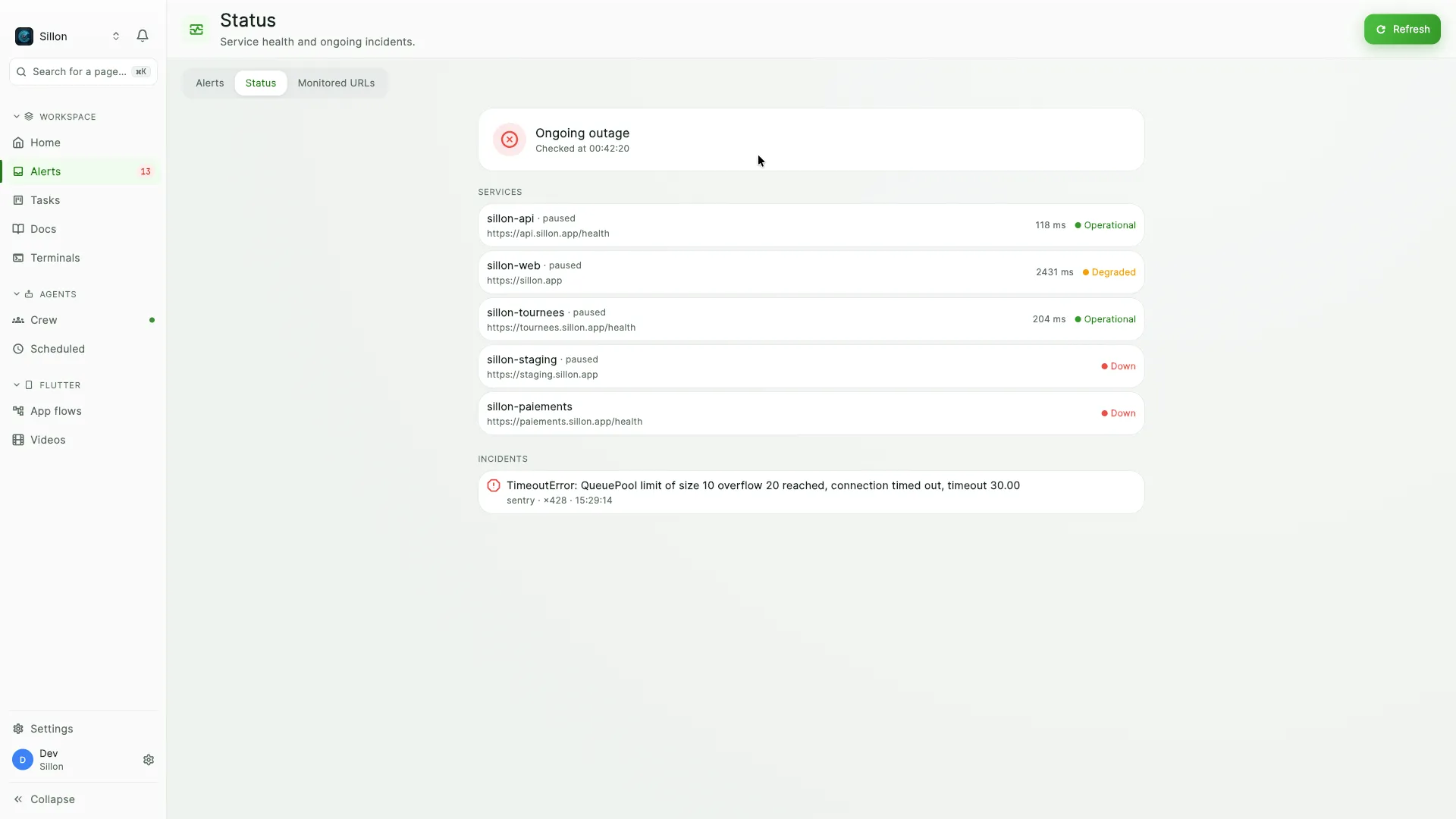
Matcha's status page for a company, showing an ongoing outage, five services with their response times and one open incident.
Uptime is not a separate product: Matcha pings the URLs, opens the alert, and closes it when the service recovers.

What it replaces

Three subscriptions, one app.

Not a bridge between your tools, and not a dashboard that reads them from a distance. The documents, the tickets and the alerts are all native here, in the same database, behind the same login.

Instead of Notion

Docs, and collections

A block editor with page versions, full-text search (and semantic search on top once you point it at a model), @mentions, backlinks, image uploads, templates, per-page permissions, a trash that gives pages back, and live co-editing. Collections carry 17 column types and render as table, board, calendar, gallery, timeline, list or chart.

What Notion cannot do: see your production.

Instead of Linear or Jira

A board that carries its context

Priorities, projects, tags, assignment, comments, checklists, dependencies, planning dates, and a full rich-text page behind any ticket that needs more than a title. An alert rule can open the ticket for you, already triaged.

What Linear cannot do: hold the runbook, or the alert that caused the ticket.

Instead of a monitoring dashboard

One feed for every red light

44 sources land in one place, deduplicated on arrival and correlated across tools. Rules re-route, mute, re-rank or open a ticket. Escalation and SLA, a daily digest, a public status page, and uptime checks Matcha runs itself.

What a dashboard cannot do: hold the board and the documents next to the incident.

Each of the three does its own third well. None of them gives a coding agent a single set of tools that covers all three. That is the part that is hard to copy.

From a red light to a closed ticket, without leaving the app.

Point your tools at it

GitHub, Railway, Sentry, Codemagic, thirty-nine more connectors, your own uptime checks, or a plain webhook from anything else. Duplicates collapse on arrival, and what belongs together gets correlated.

Work where the context already is

The alert becomes a ticket, the ticket carries its own page, the page links back to both. Nothing to paste into a second product, nothing left to drift out of sync.

Hand it to your agent

Your coding agent connects over MCP with the same 73 tools your team uses, scoped to your company. It reads the incident, opens the ticket, writes the runbook and closes it.

One appDOCSinstead of NotionTICKETSinstead of LinearALERTSinstead of a dashboardMATCHAone login, one database73 MCP TOOLSyour team and your agents

Inside

It's all here. Nothing pretends.

The first group is what everyone gets, with nothing to install beyond the app itself. The next two only show up if they apply to you. A page you cannot actually run should never sit in your sidebar pretending it works. This split is about what runs where, not about what you pay: the plans are further down.

Day to day

Everyone · nothing else to install

Alerts

44 sources in one feed, deduplicated and correlated. Open, acknowledged, resolved, archived. Archived is a mute that holds, not a resolution that reopens on the next hit. Rules, escalation and SLA, a daily digest, and built-in uptime checks that raise the alert and close it again on their own.

Public status page

One public status page per company, plus an SVG badge for your README. Two locks: the page has to be switched on, and every service has to be given a public name. An unknown slug and a disabled page return the same 404, so there is nothing to enumerate. And nothing else gets out: not the monitored URL, not an alert title.

Tasks

A board with priorities, projects, tags, assignment, comments, checklists, dependencies and planning dates. Any ticket can open a full page, and any ticket can point at the alert that caused it.

Docs

Pages: restorable versions, per-page permissions, backlinks, templates, live co-editing, a trash, and an importer for your Notion export, images included and internal links rewired. Mermaid diagrams are drawn by the app itself, by an engine compiled into it: no Node, no rendering service to call.

Collections

17 column types and 7 views: table, board, calendar, gallery, timeline, list, chart. A column can carry a formula. The server checks its syntax, the columns it names and the absence of a cycle before accepting it, and the value is recomputed when it is displayed instead of sitting stale in the database.

Terminals

Real shells inside the app, on a terminal engine written for the job, drivable by hand or by an agent, plus the message channel your agents use to reach each other. The engine gets its own section, right below.

Messages

One thread for your people and your agents. A schedule drops its prompt in an agent's inbox rather than launching anything, so a run survives a closed laptop and lands once. Who may write to whom is enforced by the server, and the company boundary is crossed by no one.

Scheduled

A cron expression wakes one of your agents with a prompt, at a fixed hour. The scheduler runs server-side: the hour does not depend on your machine being awake, and the message waits for the agent in its inbox.

If you ship a Flutter app

Two optional pages · hidden until you turn them on

App flows

Replay your app's journeys with Maestro and capture every screen it goes through, run after run. Maestro runs on your own machine; the server only files the captures away and hands them back through signed links.

Videos

The team's video library: promos, review walkthroughs, App Previews. A rendered master only ever exists on the machine that produced it. Dropped here, it becomes visible to the whole company, in a private bucket served through links that expire. Rendering itself is started from the app and runs on one of the team's Macs, not on a server you pay for.

App flows needs Maestro and a simulator: without them the entry stays hidden rather than opening onto a dead screen. The video library opens anywhere, and it is the rendering that wants a Mac with node and ffmpeg. Hiding either page never deletes what it produced, and ⌘K still finds it.

What runs on your own machine

A tool you install, or a model you bring

Agents

A crew of Claude Code sessions running on your own machine. A confined identity, a key reissued at every start, and a human checkpoint in front of anything that matters. It needs Claude Code installed and signed in on that machine.

Meetings

Record from the microphone, transcribe and summarise against the AI backends you point at: yours, on this machine or on your own network. The summary comes back as a Docs page.

Explain an alert

A short read of the incident, written by the model you configured. No model, no line. Never an empty box where an answer should be. And when your model only listens on your own network, the app makes the call itself: the server never has to reach into your machine.

Docs search

Point at an embeddings model and Docs search goes hybrid: full text, plus meaning. Without one it stays plain full text, and no page content ever leaves for a service you did not configure yourself.

These pages stay listed in Settings even when the machine cannot run them, with the missing piece named. Nothing disappears quietly.

We wrote our own terminal.

We know what goes wrong with a terminal bolted into an app: we shipped one before this. Today's engine is written inside Matcha, around Alacritty's VT core compiled along with it. You notice the difference on the first full-screen tool you launch.

Full-screen tools start, instead of hanging

A TUI interrogates the terminal before it draws anything: who are you, where is the cursor, what colour is the background. Matcha answers, with the real colours of its own theme, so those tools can pick their light or dark variant. Without those answers a prompt just sits there and nothing tells you why.

Every command becomes a block

The terminal knows where a command starts and where it ends: what you typed, which folder you were in, what it returned, its whole output. A banner keeps the running command in sight once its line has scrolled away, failures come back red, and you copy, rerun or share a block, not a mouse selection.

Sharing a block redacts the secrets first

No path copies a command and its output without going through the filter: sensitive variables, authorisation headers, URLs carrying a password, JWTs, keys with a known prefix, PEM blocks, a password glued behind a -p. The message that follows says how many it masked and asks you to read it over. A pattern filter cannot promise completeness, and pretending otherwise would be worse than saying nothing.

exit 1 · just check

Blocks · 2 failed

  • just checkexit 1
  • just formatok
  • uv run pytest -qexit 1
  • git pull --rebaseok

Block copied · 2 secrets redacted · review before sharing

The command blocks panel, rebuilt for the web · invented session. The labels are the app's own.

⌘F searches the history, with a regex

The search runs over the whole buffer it keeps, not just the visible lines, and takes a regular expression: Alacritty's own, which follows wrapped lines. Pattern that will not compile? It says so, instead of reporting zero matches and letting you believe the text is not there.

Only the lines that moved get rebuilt

Between the shell's bytes and the picture there is no queue: the engine is called directly, and hands the screen over as flat arrays (one character per cell, its colours and styles alongside), passed to the interface in one go. Each line keeps its drawing, compared cell by cell against the previous one: no fingerprint, so no collision is possible, and an unchanged line reuses its drawing instead of being rebuilt.

Your shells survive navigation

The engine lives in the session, not in the view: go read your alerts, come back, nothing restarted and no full-screen tool ends up drawn on top of itself. Quit the app and reopen it: your terminals come back, each in the folder you left it in, not the one it started from.

Your agent opens one and types in it

open_terminal, run_in_terminal, read_terminal: the agent asks, the terminal opens on your machine in a card you can see, and you take the keyboard back whenever you want. Not a sandbox off to the side. The same shell, with your environment.

One native library, three jobs.

The terminal is only the first line of that file. The same library, compiled along with the app, also carries the engine that merges a page several people are typing in, and the one that draws your diagrams. None of the three leaves the process: no network round trip, nothing to keep running on the side.

alacritty_terminalThe terminal
The VT core, borrowed from Alacritty rather than rewritten: the part that turns a shell's bytes into a screen. Around it, the rendering, the search, the command blocks and the keyboard are ours.
yrsPages written by several people
The Rust implementation of Yjs. It merges keystrokes character by character: two people in the same paragraph walk away with both sentences, not with whichever one saved last. The server reads that same binary format through the sibling Python library, so the page stays readable on its side: search, export, backlinks, and the tools your agent calls.
mermaid-rs-rendererThe diagrams
What compiles a Mermaid block into a drawing, taken without its command line tool and without its rasteriser: what is left is Rust alone, and the app paints the strokes itself. No colour is written into the Rust, they come from the app's own: a diagram cannot drift from the rest of the page.

What that costs, said plainly: the day this library is missing at startup, a page stops being editable and tells you so, with a button to try again. Typing into an editor with nothing left to merge against would be typing into the void.

Built for how a small team actually works.

Context stops being something you re-tell

The spec, the ticket it produced and the incident that reopened it are one thread, not three tabs. Nobody re-explains it at standup, because nobody had to copy it anywhere in the first place.

Agents join the team, not the side channel

Same tools, same permissions, same trail as your people. An agent's key is reissued at every start, and it only writes to the agents of its own machine and to the human who runs it: refused by the server with a 403, not by the prompt.

One company or twenty

Isolation is enforced by row-level security in the database, not by a filter someone might forget in the API. An agency watches every client from one app, and no client ever sees another.

73 tools your agent already speaks

MCP over Streamable HTTP, the same authentication as the API, scoped to your company. Not an integration bolted on the side. Alerts, board, docs, collections, terminals, agents and approvals, the whole surface.

Alerts

  • search_alerts
  • get_alert
  • find_correlated
  • set_alert_status
  • +4

Board

  • list_tasks
  • create_task
  • update_task
  • ensure_task_page
  • +4

Docs

  • search_docs
  • get_doc
  • create_doc
  • update_doc
  • +4

Agents & ops

  • open_terminal
  • run_in_terminal
  • read_terminal
  • list_agents
  • +4

Your agent authenticates the way you do: a Supabase token, or a key that belongs to one company and cannot reach outside it. Thirteen older tool names are still answered alongside these, so nothing you wired last month breaks.
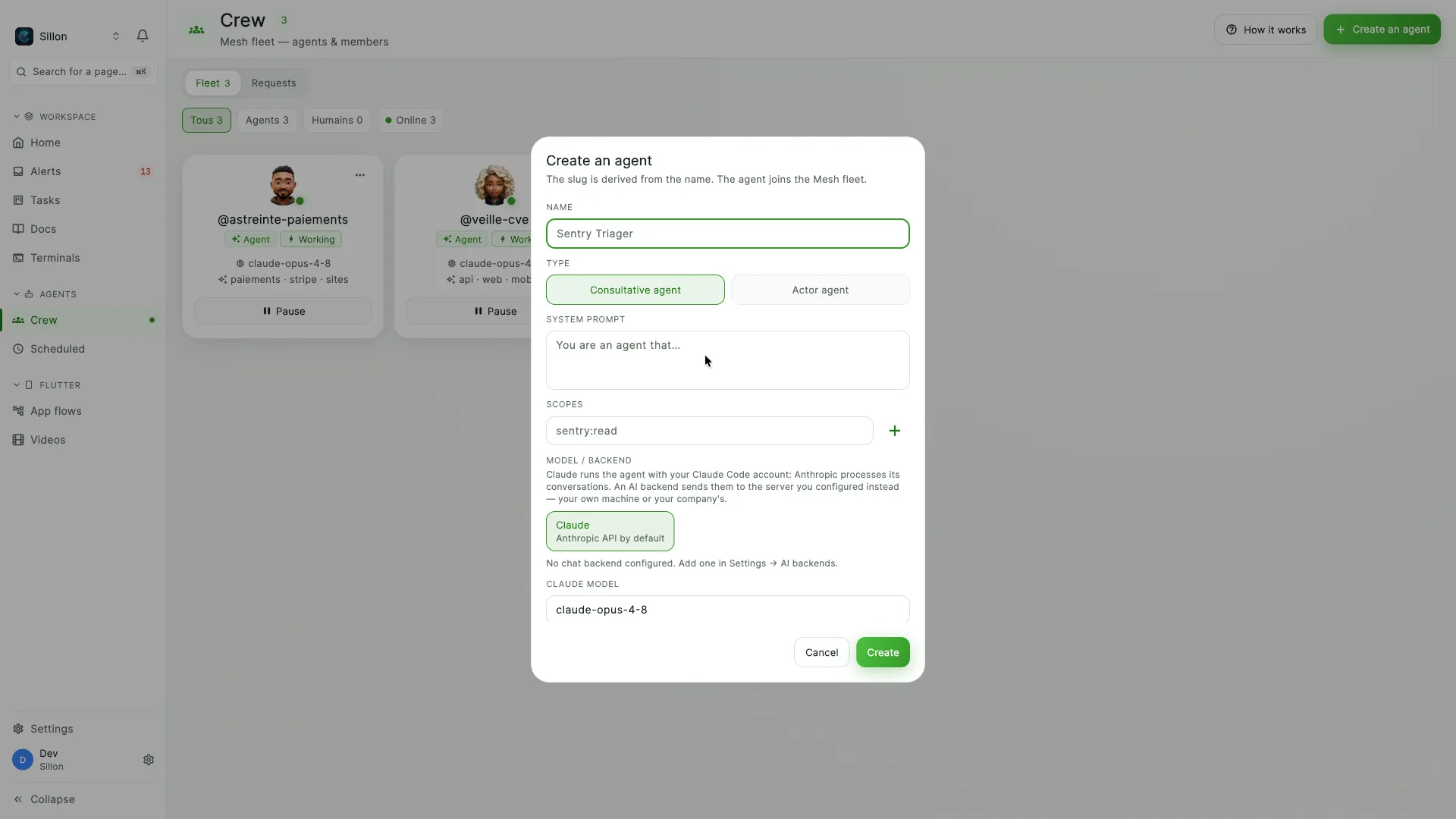
Matcha's agent creation dialog, with a name, a type, a system prompt, a scope and the choice of the model or backend that will run it.
An agent is created here, with the tools and the scopes it may use. It gets a fresh key at every start.

A schedule does not launch an agent. It drops a message.

People and agents write in the same threads, inside the app. That single choice is what makes the rest work: an agent runs on someone's machine, so it is not always awake, and a system that assumed otherwise would lose the work every time a laptop was shut. Messages wait instead.

  1. The schedule sends, it does not start anything

    At the set time, Matcha writes a message from cockpit-cron to the agent you picked. It goes through the exact same layer a teammate would use. Nothing is spawned, nothing is woken, nothing fails if the machine is off.

  2. The inbox is the queue

    There is no separate broker holding the backlog: an agent's inbox is simply the messages it has not acknowledged yet. Close your laptop for a weekend and the Friday run is still there on Monday, in order, once.

  3. The agent reads, works, acknowledges

    On start it reads its inbox, handles each message, then acknowledges it. An acknowledged message never comes back. That is the whole protocol, and it is the same one a person follows in a thread.

  4. The thread stays

    What the agent was asked, what it answered and who else was in the conversation stay readable next to the alert and the ticket they came from. You are not reconstructing a night run from a log file.

Who may write to whom is decided by the server

The company is the outermost boundary and nothing crosses it, not even two people. Inside it, agents talk within their own machine and to the human who runs it, people talk to each other across machines, and a remote machine never reaches another machine's agents. Supervision is granted at provisioning time and cannot be self-declared. An agent that tries anyway gets a 403: the rule lives in the server, not in the prompt it was given.

Live updates use a token scoped to your company, so the push respects the same boundary as the read.

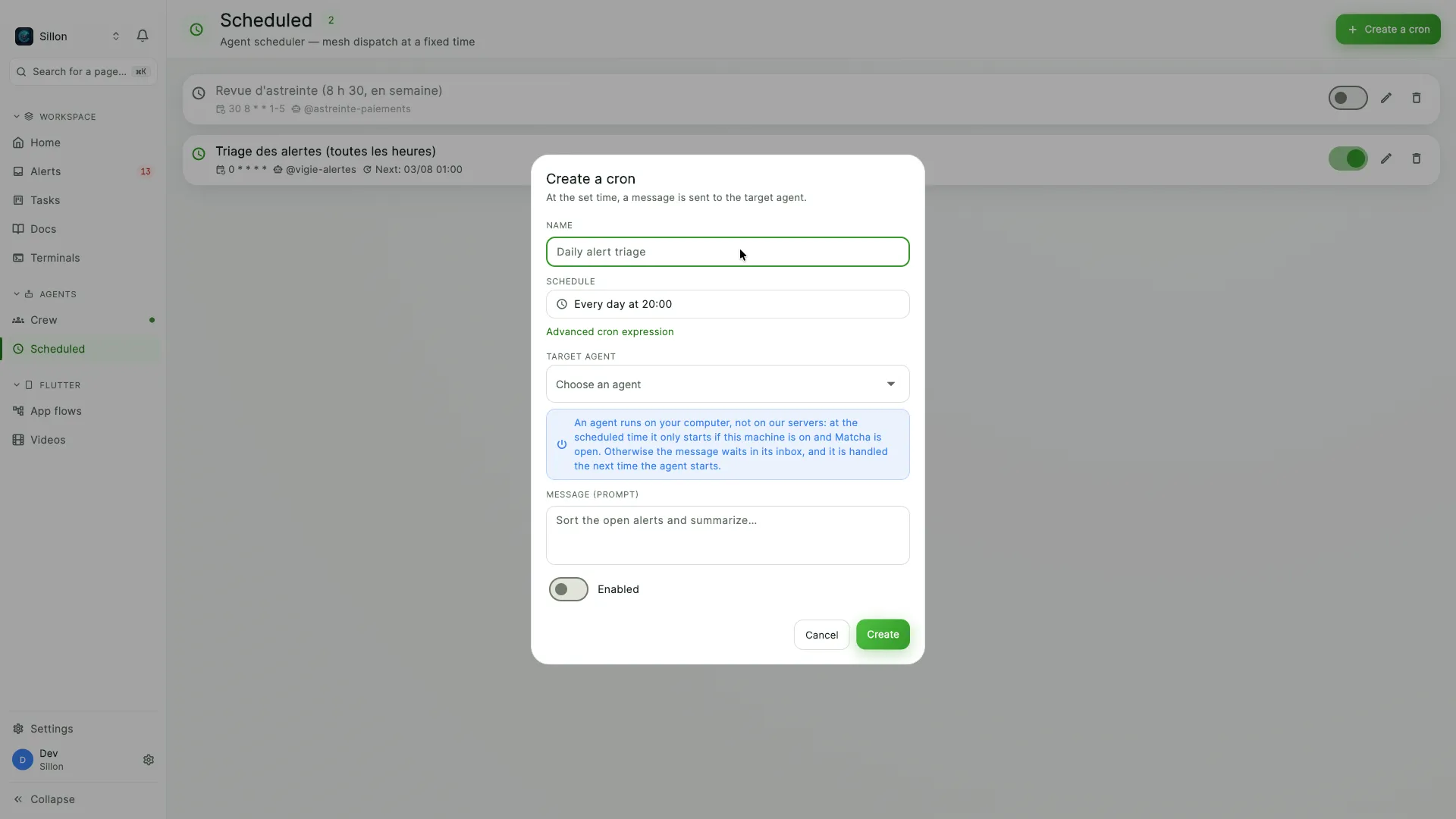
The scheduling dialog in Matcha, showing a daily run targeting an agent, with a note explaining that the agent starts only if the machine is on and that the message otherwise waits in its inbox.
The app says it in the dialog itself: if the machine is off, the message waits in the inbox and is handled at the next start.

Install what you do. Not the rest.

The left rail is not the same from one team to the next. Matcha grows by modules: a module brings its own pages, a company installs it or doesn't, and the app only draws what has been installed. Nothing gets downloaded along the way: all the code already sits in the signed app on your disk. Installing is switching on.

A company decision, not a user preference

Installing happens inside the app, from an owner or admin account, and it holds for everyone in the company. Before it draws an entry, the rail checks that the module behind it is actually installed here. Your agent cannot make that call for you: its key reads the catalogue, it subscribes to nothing.

Uninstalling deletes nothing

It hides the pages and closes the door, and that is all it does. The runs, the captures and the rendered videos stay in the database, scoped to your company. Reinstall six months later and the history is still whole.

And when the answer never comes back, nothing is hidden. A rail cut short by a failed request would be one more mystery, not a simpler app.

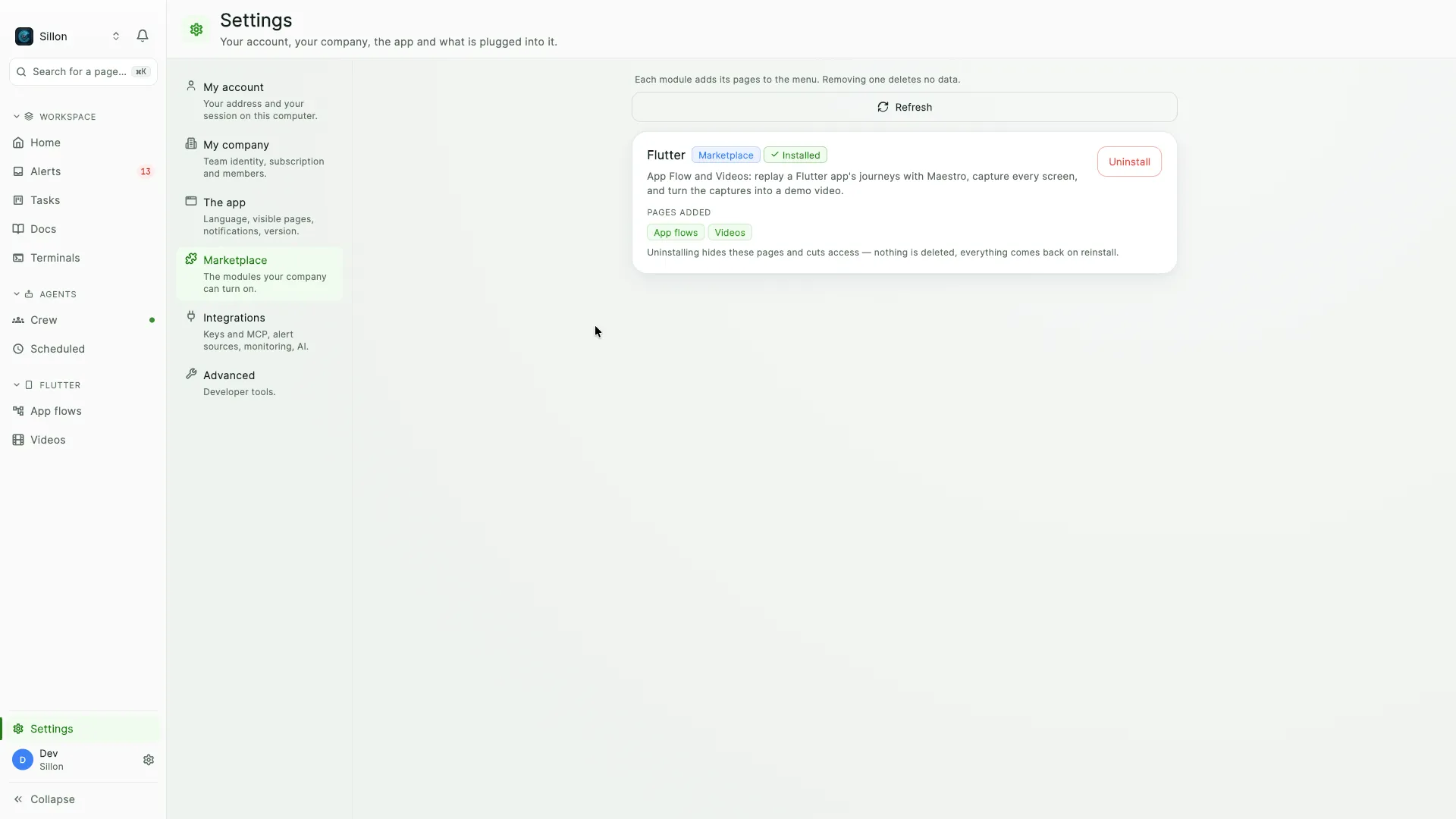
The Marketplace tab of Matcha's settings, with the Flutter module installed and the two pages it adds to the sidebar listed underneath.
A module names the pages it adds. Uninstalling hides them and cuts access; nothing is deleted, and nothing gets downloaded when you install.

We run our own companies on it.

Matcha started life as Despii's internal ops hub: our production alerts have landed in it since day one, and our tickets, our documents and our agents followed. Four teams work in it today. Two of them are ours, and we would rather write that down than pass a house logo off as a customer.

  • DespiiOur own company
  • miissionOur own company
  • AvanssAnother team
  • MuwpayAnother team

What using it means here

The rule is written into the product's own repository: no piece of work starts without its ticket in Matcha, and the coding agent is the one that opens it, moves it and comments on it over MCP. Our backends report into the same feed: continuous integration, deployments, application errors, mobile builds and the uptime checks Matcha runs itself. Every company is walled off in the database by the same rule, ours included.

No logos: we don't have the files, and a name you can look up proves as much.

Your agents run on your machine. Not on our servers.

Matcha's backend hands an agent its instructions, its keys and the list of tools it is allowed to use, then stops there. The process itself starts on your desk: a real Claude Code session, launched by the app, running on your disk.

Runs on your machine

  • The agent process: a real Claude Code session
  • Its workspace, your terminal, your network
  • The call to the model, sent from here

Stays in Matcha's backend

  • Its instructions and the tools it is allowed to use
  • Alerts, tickets, documents: the shared record
  • Its keys, minted fresh at every start

Point it at your own model

An agent can run against a model you host (Ollama, LiteLLM, a server on your own network) instead of the Anthropic API. The source it reads then goes to your model and nowhere else. The endpoint has to speak the Anthropic Messages API, which is the one Claude Code already uses.

Inference stays on your account

The agent signs in with your own Claude Code account, so tokens are billed exactly where they already were. We charge per seat and never resell inference. Anyone running agents on their own servers pays for those tokens, and has to bill them back to you.

An identity that cannot roam

An agent only writes to the other agents of its own fleet. Reaching a human, another machine or another company is refused by the server, not by the prompt. And its key is reissued at every start, so a key captured from an older run is already dead.

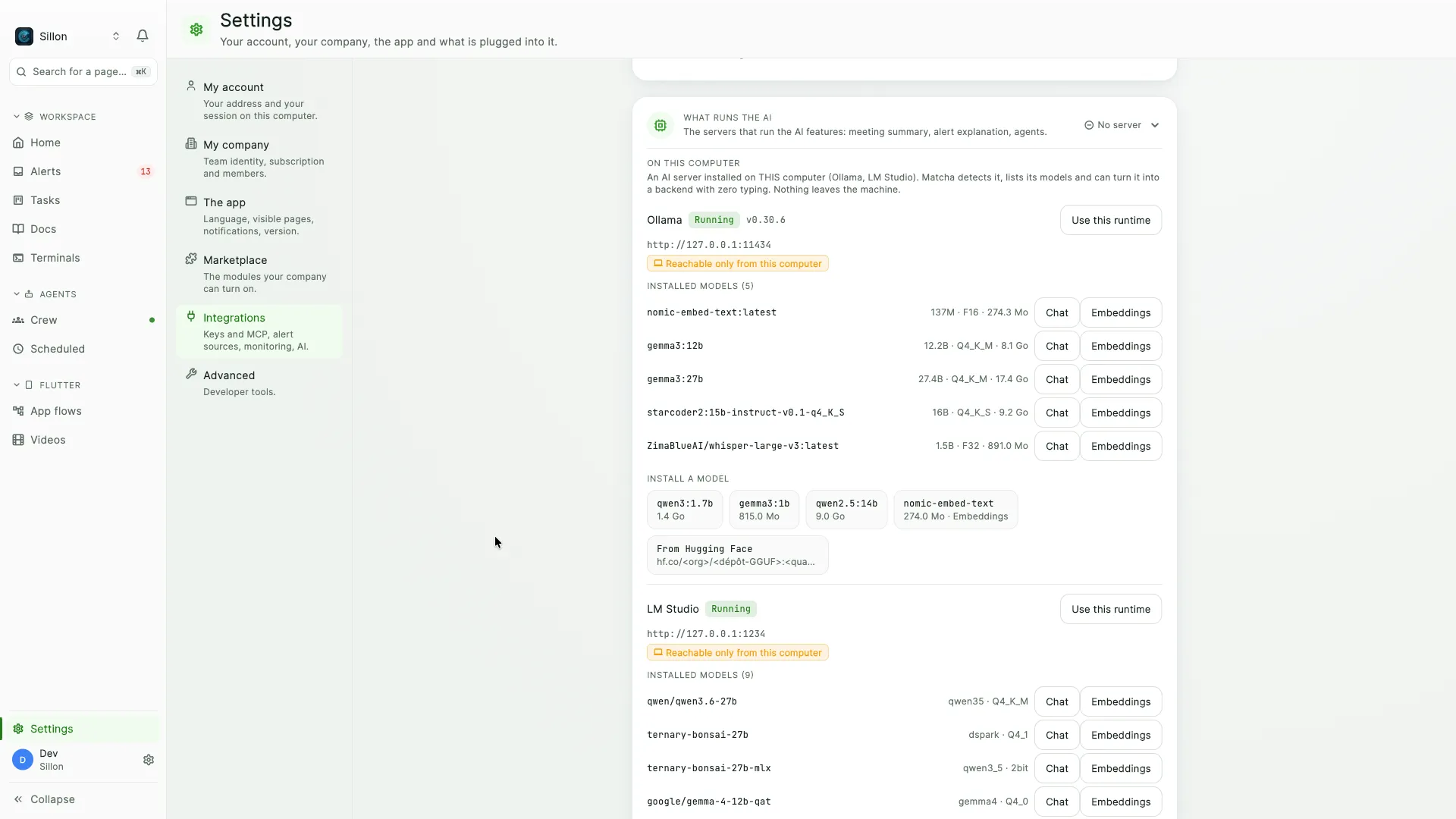
Matcha's AI settings, listing the Ollama and LM Studio runtimes detected on the machine with their installed models and their local addresses.
Matcha finds the runtimes already installed on the machine, lists their models, and turns one into a backend without a line of configuration. Both are reachable from this computer only.

Pricing

Per seat, with the ceilings written down.

Prices exclude tax: applicable VAT is added at payment, based on your country and status. Billing opens with the public launch. Early access costs nothing, and you keep that until then.

Free

$0

one seat

  • Alerts, board, docs and MCP
  • 3 alert sources, one company
  • One agent, enough to watch the loop close
  • No uptime checks
Get early access

Pro

$12

per seat / month

  • Everything in Free, up to 5 seats
  • 20 sources, 25 uptime checks
  • 10 agents and scheduled runs
  • Escalation, SLA, daily digest
  • Flutter plugin included
Get early access

Most complete

Team

$20

per seat / month

  • Everything in Pro, up to 25 seats
  • Unlimited companies
  • 100 sources, 100 uptime checks, 50 agents
  • Scoped API keys, one company each
  • Isolation enforced in the database
Get early access

Enterprise

Let's talk

custom terms

  • Everything in Team, no ceilings
  • Terms and invoicing to fit
Get early access

These ceilings are the ones the product enforces, not a table written for a web page: the API, the app and the schedulers all read the same grid.

FAQ

Straight answers.

Does it really replace Notion?

Documents are a product here, not a notes tab: block editor, versions you can restore, per-page permissions, live co-editing, backlinks, templates, and collections with 17 column types across seven views. And you can bring your wiki over. Matcha imports a Notion Markdown & CSV export, rebuilds the tree, turns exported databases into collections, and hands you a report of what it could not take.

And Linear or Jira?

The board has priorities, projects, tags, assignment, comments, checklists, dependencies and planning dates, and any ticket opens a full page. What it adds is the part a standalone tracker cannot have: the ticket is linked to the alert that caused it, in the same database, so closing one is not a second piece of admin.

And my monitoring dashboard?

For alerts, yes: 44 sources in one feed, deduplicated and correlated, with rules, escalation, SLA, a daily digest, a public status page, and uptime checks Matcha runs itself. For metrics, no, and we would rather say so. Matcha reads what your tools already detected. It does not replace the tracing in Sentry or the graphs in Datadog, it collects what they decided was worth waking someone for.

What is MCP, concretely?

The protocol your coding agent already speaks. Matcha exposes 73 tools over it with the same authentication as the API, so an agent can search alerts, open tickets, edit a collection and write documentation with no glue code to maintain. Thirteen older tool names still answer alongside them, so an agent wired last month keeps working.

Do I need Claude Code installed?

For the agent crew, yes: Matcha launches your own Claude Code, on your machine, with the prompt and the keys it just issued. Everything else (alerts, board, docs, MCP) works without it.

Is my data isolated from other companies?

Yes, and not merely in the API: isolation is enforced by row-level security in the database itself. An API key belongs to one organisation and cannot reach outside it, and a request for a company you are not a member of is refused rather than quietly served.

Can I use it today?

Early access goes out in batches. Leave your address and the macOS app arrives with your invite; Windows and Android follow.

Close the other tabs.

Early access goes out in batches. Leave an address and you're in the next one.

One address, one purpose. No list, no tracker, no digest you didn't ask for.

The macOS app arrives with your invite. Windows and Android follow.